Year 2008 was marked by an important event of my life and my career. I have joined ING Direct Japan (INGDJ) and moved to Tokyo in September. So far I feel OK. Within last 4 months, I have done a couple of things. Technically
1. Learned how to manage WebSphere Application Server and MQ infrastructure in a complex IT environment for banking business.
2. Write a bundle of ruby scripts to perform administrative activities related to WebSphere including system monitoring, log management and application deployment.
3. Learned JVM internal stuff like GC, heap dump, core dump analysis tools, JAVA decompiler and JVM assembler language
4. Use VIM (as primary editor) and GIT
5. Learned Python and it's Java implementation Jython primarily and use it for WebSphere Application Server scripting
Monday, January 12, 2009


Friday, November 28, 2008
Using VIM in troubleshooting JAVA application
After trying many Text Editor available on Windows as TexPad, UltraEdit, Wordpad, Notepad, etc. , finally I decided to use vim, an enhanced version of unix vi. Vim is never been an easy choice but once you master it, it is wonderful, it give you high productivity. Also it is free.
Some basic vi commands can be found in http://www.cs.uiuc.edu/class/fa07/cs225/calendar/vim.pdf.
During my daily work, I often have to troubleshoot complex JAVA application. Sometime I get exception with full JAVA stack printout, but the application is provided by vendor without source code so there is very difficult to find a root cause.
There is a tool called JAD that can decompile JAVA classes. Because my primary editor is VIM so I decided to integrate the JAD into VIM. Googling a while, I found vim JAD plugin, that display decompiled java class whenever we open the class file. However JAVA application(s) are mostly provided in form of several jar, zip, ear package so it is not so convenient.
There is luckily zip plugin that is part of vim installation and can browse zip, jar, ear package and display content of selected file inside the package when we hit enter. Modify just few lines of this plugin, I am able to browse content of jar, zip file and view a decompiled inside JAVA class.
The steps is as follows (for version 7.2, that was installed in D:\Vim\)
1. open D:\Vim\vim72\autoload\zip.vim and change
3. start vim and open a jar file, a list of files inside the jar file will be displayed
4. select one class file and hit ENTER The '-lnc' option of JAD display line number of original source code as comment on the left side of decompiled code so it can be used to identify which part of code cause an exception.
Some basic vi commands can be found in http://www.cs.uiuc.edu/class/fa07/cs225/calendar/vim.pdf.
During my daily work, I often have to troubleshoot complex JAVA application. Sometime I get exception with full JAVA stack printout, but the application is provided by vendor without source code so there is very difficult to find a root cause.
There is a tool called JAD that can decompile JAVA classes. Because my primary editor is VIM so I decided to integrate the JAD into VIM. Googling a while, I found vim JAD plugin, that display decompiled java class whenever we open the class file. However JAVA application(s) are mostly provided in form of several jar, zip, ear package so it is not so convenient.
There is luckily zip plugin that is part of vim installation and can browse zip, jar, ear package and display content of selected file inside the package when we hit enter. Modify just few lines of this plugin, I am able to browse content of jar, zip file and view a decompiled inside JAVA class.
The steps is as follows (for version 7.2, that was installed in D:\Vim\)
1. open D:\Vim\vim72\autoload\zip.vim and change
fun! zip#Read(fname,mode)
...
  exe "silent r! ".g:zip_unzipcmd." -p -- ".s:Escape(zipfile,1)." ".s:Escape(fname,1)
...
endfun
to
fun! zip#Read(fname,mode)
...
 if fname =~ '.class$'
   exe "silent r! ".g:zip_unzipcmd." -o -- ".s:Escape(zipfile,1)." ".s:Escape(fname,1)
   exe "silent r! jad -lnc -p ".s:Escape(fname,1)
 else
   exe "silent r! ".g:zip_unzipcmd." -p -- ".s:Escape(zipfile,1)." ".s:Escape(fname,1)
 endif
...
endfun
2. download unzip.exe, jad.exe and put them in the PATH
3. start vim and open a jar file, a list of files inside the jar file will be displayed

4. select one class file and hit ENTER
 The '-lnc' option of JAD display line number of original source code as comment on the left side of decompiled code so it can be used to identify which part of code cause an exception.
Saturday, November 8, 2008
Simple Python Syntax
Start interpreter and print out something then exit
To run a script within Python interpreter use execfile(path), it is useful for people who use Jython, because startup time of JVM is horrible . e.g
This is one of my most frequently used statement, Python follow style of C printf function
Python has nice methods get a substring from string
Unlike Ruby, Python string can not be changed directly
List and tuple
Python has tuple and list for representation of variable size array of items. Tuple is immutable array while list is mutable. People think that list is intended for homogeneous while tuple is for non-homogeneous, but this is convention only is not enforced by the language. However some api accept only tuple as argument e.g. String format %, that sometime lead to a confusion. In contras Ruby has only Array.
example of tuple
Python has hash structure called dictionary
Class, Object, method
Class is defined using class keyword, name of a class can start lower case or upper case character, which is different from Ruby. Ruby requires name of class start with upper case character.
However the convention is that, name of built-in class as string, unicode, list, tuple start with lower case character while user-defined class starts with upper case.
example of built-in class
Every Python script store in a file is a module, the name of the file is module name.
Beside normal position based parameters, Python has two extra forms of passing parameters to a function
The first form is argument list, in which caller pass a list parameters and calling function receives them in form of an array.
Closures
Python closures
C:\python
ActivePython 2.5.2.2 (ActiveState Software Inc.) based on
Python 2.5.2 (r252:60911, Mar 27 2008, 17:57:18) [MSC v.1310 32 bit (Intel)] on
win32
Type "help", "copyright", "credits" or "license" for more information.
>>> print 'hello world'
hello world
>>> print 1+2+3
6
>>> exit()
Run a script in the interpreter
To run a script within Python interpreter use execfile(path), it is useful for people who use Jython, because startup time of JVM is horrible . e.g
>>execfile('sample.py')
Create string from a template
This is one of my most frequently used statement, Python follow style of C printf function
>>> "my name is %s, my age is %d" % ("Goto",30)
'my name is Goto, my age is 30'
>>>
Ruby has the same function
irb(main):004:0> "my name is %s, my age is %d" % ["Goto",30]
=> "my name is Goto, my age is 30"
irb(main):005:0>
but there is nicer way to do it
irb(main):005:0> name,age = "Goto",31
=> ["Goto", 31]
irb(main):006:0> "my name is #{name}, my age is #{age}"
=> "my name is Goto, my age is 31"
Create a substring from a string
Python has nice methods get a substring from string
>>> s='hello world'
>>> s[0]
'h'
>>> s[0:10] #substring from a position(inclusive) until other (non inclusive)
'hello worl'
>>> s[2:] #substring to end of string
'llo world'
>>> s[:2] #substring from start until other (non inclusive)
'he'
>>> s[-2:] #negative position indicates position from end of the string
'ld'
The equivalent in Ruby would be
$ irb
>> s="hello world"
=> "hello world"
>> s[0]
=> 104
>> s[0..0]
=> "h"
>> s[0..(10-1)] #unlike Python, Ruby includes the end position
=> "hello worl"
>> s[2..-1] # -1 indicate relative position from end
=> "llo world"
>> s[0..(2-1)]
=> "he"
>> s[-2..-1]
=> "ld"
Unlike Ruby, Python still throw
out of range exception for single indice operation
>>> s[20] Traceback (most recent call last): File "String is immutable", line 1, in IndexError: string index out of range >>> s[20:30] # this is OK as it consider as slice operation ''
Unlike Ruby, Python string can not be changed directly
>>> s[0:5] 'hello' >>> s[0:5]="bye" Traceback (most recent call last): File "In Ruby we can do", line 1, in TypeError: 'str' object does not support item assignment >>> s1 = "bye" + s[5:] # to achieve the same goal we need create string from other string >>> print s1 bye world
>> s[0..4]="bye"
=> "bye"
>> print s
bye world=> nil
As string is considered value object, create new string instead of changing an existing express that concept more clearly.
List and tuple
Python has tuple and list for representation of variable size array of items. Tuple is immutable array while list is mutable. People think that list is intended for homogeneous while tuple is for non-homogeneous, but this is convention only is not enforced by the language. However some api accept only tuple as argument e.g. String format %, that sometime lead to a confusion. In contras Ruby has only Array.
example of tuple
>>> y=('a',2)
>>> y[1]=1
Traceback (most recent call last):
  File "<stdin>", line 1, in <module>
TypeError: 'tuple' object does not support item assignment
>>> y
('a', 2)
example of list
>>> x=['a',2]
>>> x[1]=1
>>> x
['a', 1]
iterate over list or tuple
>>> items = ('a','b',2)
>>> for e in items:
...   print e
...
a
b
2
Hash aka dictionary
Python has hash structure called dictionary
>>> h = {1:'a',2:'b',3:'c'}
>>> h.__class__
<type 'dict'>
>>> h[3] = 'z'
>>> h
{1: 'a', 2: 'b', 3: 'z'}
>>>
iterate over dictionary
>>> for k,v in h.iteritems():
...   print "%d=>%s" % (k,v)
...
1=>a
2=>b
3=>z
h.items() also works well
Class, Object, method
Class is defined using class keyword, name of a class can start lower case or upper case character, which is different from Ruby. Ruby requires name of class start with upper case character.
However the convention is that, name of built-in class as string, unicode, list, tuple start with lower case character while user-defined class starts with upper case.
example of built-in class
>>> y = ('a',2)
>>> y.__class__
<type 'tuple'>
>>> y.__class__ == tuple
True
>>> z = tuple(y)
>>> z
('a', 2)
example of user defined class
>>> class Foo:
...   def m(self):
...     print self.__class__
...
>>>
>>> Foo().m()
__main__.Foo
>>>
Module
Every Python script store in a file is a module, the name of the file is module name.
$ cat hello.py
def say(whom):
  return "hello %s" % whom
To use method defined in a module, just import the module and call the function preceding by the module name plus '.'
>>> import hello
>>> hello.say('world')
'hello world'
It is also common to mix module methods into current name space, so we can call method without typing module name
>>> from hello import *
>>> say('moon')
'hello moon'
>>>
Parameters
Beside normal position based parameters, Python has two extra forms of passing parameters to a function
*params and **params.
The first form is argument list, in which caller pass a list parameters and calling function receives them in form of an array.
 def foo(*numbers):
      return sum(numbers)

print foo(23, 42)        # prints: 65
The second form is name based, in which caller pass a list name,value pairs and calling function receives then as a hash map.
def bar(**options):
  if "verbose" in options and options["verbose"]:
     print "verbose is ON"
  else:
     print "verbose is OFF"

bar(verbose=True) # print: "verbose is ON"
bar(verbose=False) # print: "verbose is OFF"
bar(force=True) # print: "verbose is OFF"
Closures
Python closures
Thursday, October 30, 2008
Where to download RPM package(s) for RedHat Linux
If you are looking for RPM package(s) for LINUX, then you should look at this site http://linuxsoft.cern.ch/. The binary rpm package are built from source SRPM available in http://ftp.redhat.com/pub/redhat/linux/enterprise/. They are well organized, complete and updated. The slc4X directory is equivalent to RedHat ES/AS 4 while slc5X to RedHat ES/AS 5.
If you have not RedHat Linux media in hand for what ever reason, this is definitely a good help.
If you have not RedHat Linux media in hand for what ever reason, this is definitely a good help.
Tuesday, September 9, 2008
First few days in ING Direct Japan
The first day was just for formality. I was given temporary access card (RFID card), seat and account to access the company computer. Then a lady from IT team took me to the local ward office for alien card registration and to local bank (Shinsei) to open a account to which the company can pay me.
The second day is workshop on kind corporate value and culture , they called it Orange value, where we listened to the CEO speed of ING group system of value, did self introduction, play game, conduct group discussion organized by external consultant.
The second day is workshop on kind corporate value and culture , they called it Orange value, where we listened to the CEO speed of ING group system of value, did self introduction, play game, conduct group discussion organized by external consultant.
Thursday, September 4, 2008
Testing Oracle Real Application Cluster
Installation and configuration of Oracle RAC is always challenging task even for an experienced dba.
I read a story saying that a database administrator will laugh at you if you ask him to create a workable RAC of 2 nodes within a week.
Oracle RAC is definitely complex environment but is it so difficult and time consuming to deploy ?
To find an answer, I decided to try install Oracle RAC 10.2 on my small computer with 2 GB RAM. I used VMWARE server to create the environment of 2 linux nodes, that concurrently access shared database on cluster file system OCFS2.
I took me not one week but nearly 4 day(s), during which, I have solved various encountered problems. Below are some notes that you need to consider before attempting similarly
Documentation
http://www.oracle-base.com/articles/rac/ArticlesRac.php
http://www.dbasupport.com/oracle/ora10g/index_RAC.shtml These two freely available resources are quite good, concise and practical beside metalink and official manual.
Summary of problems
Believe or not, the fact is that most of problems are rooted from
- mis-configuration of hardware and OS: without time synchronization between nodes, Clusterware misbehaves
- not install latest patch: many things suddenly work after installing latest patch
Oracle RAC document is generally not good
- it is huge and verbose: the Oracle Clusterware and Oracle Real Application Clusters Administration and Deployment Guide 10g Release 2 (P/N: B14197-08) is 400 pages thick
- knowledge is split across many metalink notes making it difficult in orientation: to understand why we need proper setting of default gateway for a public network interface and its role, we need search metalink more than once
- It is usually difficult and expensive to create environment for practical testing
The RAC software stack
RAC Software stack consists of 2 layers sitting on top of OS
a. RDBMS: Oracle RDBMS with RAC as Option
b. Clusterware: CRS – Cluster Ready Service
c. Operating System: Linux, Windows, AIX
By implementing CRS component to play a role of Clusterware, Oracle wants to remove dependency of RAC from Clusterware traditionally provided OS and third party vendor.
CRS need two device(s)/file(s) to store it's data; voting disk and oracle cluster registry - OCR . Because only one CRS is needed to support multi database(s), it is good to keep voting disk and OCR in a location independent from location for a database files.
VMWARE Server configuration
To experiment with Oracle Clusterware, also called Cluster Ready Service (CRS) and RAC, we need VMWARE Server. VMWARE Workstation does not work because it does not support concurrent access to a share disk.
The config file (*.vmx) of each node shall be specially modified to disable disk locking and cache. By doing it, a hard disk created as file on host system can be safely attached to 2 VMWARE nodes. An example of special setting is taken from Oracle RAC Installation on VMWARE article given below
RAC requires at least 2 NIC per node, one for private network and one for public network. Private network is used for communication between nodes while public network is for serving clients.
In case of public network RAC does not use the host IP address for client communication but what it calls service or virtual IP address (VIP). In the public network, the VIP address has the same netmask as the host IP address, it is managed (assigned/un-assigned to the NIC) by Cluster Ready Service - CRS so in case of failure of one node, the VIP address of the fail node will be move to surviving one by CRS.
It is good to follow some naming convention for host name. Example is given below
Enabling remote shell (RSH) and login (RLOGIN)
Oracle Universal Installer (OUI) uses RSH and RLOGIN to install software on multi nodes, which means we run OUI only on one node and it will automatically copy the software (CRS and RAC) and configure on other nodes. Other configuration programs as VIPCA, NETCA and DBCA also work similarly and depend on RSH and RLOGIN to perform remote operation.
Therefore we need to enable RSH and RLOGIN on all nodes before running installation program. The example below demonstrate how to enable RSH and RLOGIN.
Configure RSH
Oracle clusterware CRS use time from nodes for it activities, so keeping time synchronized on all nodes is required. The clock synchronization method on unix is using NTP services, in which a machine contact other with preciser clock a reference clock, on regular interval to retrieve time and update its own clock.
In the following example, node rac1 is used as reference clock while rac2 use rac1 as it's reference clock. Sometime this configuration does work well due to the reason that VMWARE hypervisor provide very bad clock implementation, therefore it is recommended to use an external physical server as reference clock , if we can have connection to Internet then use one of available real reference clocks.
CRS communication between nodes happens via TCP and UDP, so it is important to turn off firewall in all nodes to allow inter nodes traffic.
RAC use shared disk architecture, in which all nodes have to access (for both read and write) to a same collection of database and others files located in a external hard disk. There are few options, one is to keep these files on raw devices, which is usually quite painful due to it's complex administration ranging from creation to maintenance. Other option is store them on file system, because traditional unix file system don't allow access from multi nodes, we need a special one, a cluster file system. There are different cluster file system available for different OS, e.g. GFS on AIX, Oracle has implemented a cluster file system on LINUX called OCFS2.
Install OCFS2 is fairly simple and easy
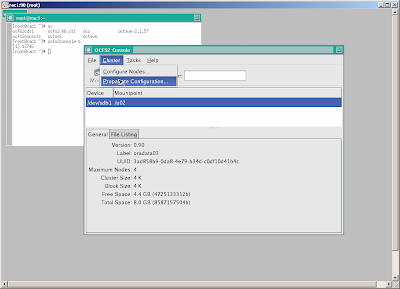
 Propagate the configuration to other node
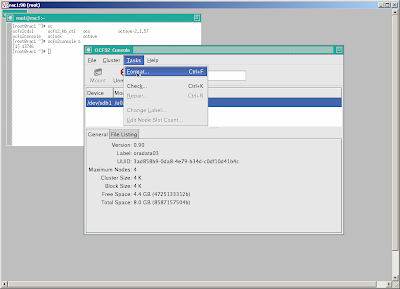
 Create and format cluster file system, note that we shall create a cluster filesystem on a shared disk, that is accessible from both nodes.
 Start OCFS2 services and mount cluster file system at startup
For the first node
Create the new groups and users.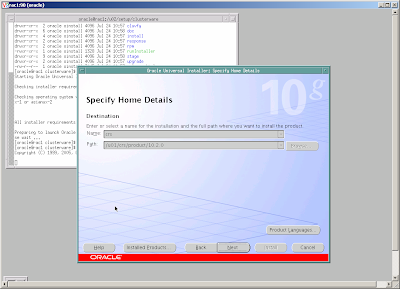 Follow instructions and
- add node rac2 to make sure that there are two nodes in the cluster - for each node specify public node name (rac1, rac2), virtual host name (rac1-vip, rac2-vip) and private node name (rac1-priv, rac2-priv), this is also important to specify an IP of a reliable host of the same public network as gateway.
- specify public network for public and virtual IP and private network for private IP
- specify u02/crsdata/ocr.dbf as OCR and /u02/crsdata/votedisk.dbf as voting disk location and external redundancy OUI will perform installation on one node then using RSH to copy to other node, during final phase of the installation process, script root.sh shall be invoked manually as root on each node.
At the end, OUI will run virtual IP configuration assistant - VIPCA, that create and persist configuration of VIP, ONS and GSD etc. as resource in OCR.
If for any reason (e.g. mis typing, incorrect IP) VIPCA fails, we can re run it under root after correction.
Install Oracle Database Software and create a database
The installation of Oracle Database Software is similar as for non-RAC version, only different is after completion on one node, the OUI will copy the software to other node.
At the end of this process two configuration programs will be invoked
- a database configuration assistant - DBCA for database creation and
- a network configuration assistant - NETCA for listener and tnsname configuration
I read a story saying that a database administrator will laugh at you if you ask him to create a workable RAC of 2 nodes within a week.
Oracle RAC is definitely complex environment but is it so difficult and time consuming to deploy ?
To find an answer, I decided to try install Oracle RAC 10.2 on my small computer with 2 GB RAM. I used VMWARE server to create the environment of 2 linux nodes, that concurrently access shared database on cluster file system OCFS2.
I took me not one week but nearly 4 day(s), during which, I have solved various encountered problems. Below are some notes that you need to consider before attempting similarly
Documentation
http://www.oracle-base.com/articles/rac/ArticlesRac.php
http://www.dbasupport.com/oracle/ora10g/index_RAC.shtml These two freely available resources are quite good, concise and practical beside metalink and official manual.
Summary of problems
Believe or not, the fact is that most of problems are rooted from
- mis-configuration of hardware and OS: without time synchronization between nodes, Clusterware misbehaves
- not install latest patch: many things suddenly work after installing latest patch
Oracle RAC document is generally not good
- it is huge and verbose: the Oracle Clusterware and Oracle Real Application Clusters Administration and Deployment Guide 10g Release 2 (P/N: B14197-08) is 400 pages thick
- knowledge is split across many metalink notes making it difficult in orientation: to understand why we need proper setting of default gateway for a public network interface and its role, we need search metalink more than once
- It is usually difficult and expensive to create environment for practical testing
The RAC software stack
RAC Software stack consists of 2 layers sitting on top of OS
a. RDBMS: Oracle RDBMS with RAC as Option
b. Clusterware: CRS – Cluster Ready Service
c. Operating System: Linux, Windows, AIX
By implementing CRS component to play a role of Clusterware, Oracle wants to remove dependency of RAC from Clusterware traditionally provided OS and third party vendor.
CRS need two device(s)/file(s) to store it's data; voting disk and oracle cluster registry - OCR . Because only one CRS is needed to support multi database(s), it is good to keep voting disk and OCR in a location independent from location for a database files.
VMWARE Server configuration
To experiment with Oracle Clusterware, also called Cluster Ready Service (CRS) and RAC, we need VMWARE Server. VMWARE Workstation does not work because it does not support concurrent access to a share disk.
The config file (*.vmx) of each node shall be specially modified to disable disk locking and cache. By doing it, a hard disk created as file on host system can be safely attached to 2 VMWARE nodes. An example of special setting is taken from Oracle RAC Installation on VMWARE article given below
...
...
disk.locking = "FALSE"
diskLib.dataCacheMaxSize = "0"
diskLib.dataCacheMaxReadAheadSize = "0"
diskLib.dataCacheMinReadAheadSize = "0"
diskLib.dataCachePageSize = "4096"
diskLib.maxUnsyncedWrites = "0"

scsi1.present = "TRUE"
scsi1.virtualDev = "lsilogic"
scsi1.sharedBus = "VIRTUAL"
...
...
Network setting
RAC requires at least 2 NIC per node, one for private network and one for public network. Private network is used for communication between nodes while public network is for serving clients.
In case of public network RAC does not use the host IP address for client communication but what it calls service or virtual IP address (VIP). In the public network, the VIP address has the same netmask as the host IP address, it is managed (assigned/un-assigned to the NIC) by Cluster Ready Service - CRS so in case of failure of one node, the VIP address of the fail node will be move to surviving one by CRS.
It is good to follow some naming convention for host name. Example is given below
/etc/hosts
# public
190.2.4.100             rac1 rac1-en0
190.2.4.101             rac2 rac2-en0

# private
9.2.4.100               rac1-priv rac1-en1
9.2.4.101               rac2-priv rac2-en1

# virtual
190.2.4.200             rac1-vip
190.2.4.201             rac2-vip
CRS need a gateway assigned to a public network interface in order to reliably detect failure of NIC and node. It is important to use a IP of a live machine reachable from all nodes but it is not necessarily a gateway.
Enabling remote shell (RSH) and login (RLOGIN)
Oracle Universal Installer (OUI) uses RSH and RLOGIN to install software on multi nodes, which means we run OUI only on one node and it will automatically copy the software (CRS and RAC) and configure on other nodes. Other configuration programs as VIPCA, NETCA and DBCA also work similarly and depend on RSH and RLOGIN to perform remote operation.
Therefore we need to enable RSH and RLOGIN on all nodes before running installation program. The example below demonstrate how to enable RSH and RLOGIN.
Configure RSH
[root@rac1 ~]# rpm -q -a | grep rsh
rsh-0.17-25.4
rsh-server-0.17-25.4

[root@rac1 ~]# cat /etc/xinetd.d/rsh
# default: on
# description: The rshd server is the server for the rcmd(3) routine and, \
#       consequently, for the rsh(1) program.  The server provides \
#       remote execution facilities with authentication based on \
#       privileged port numbers from trusted hosts.
service shell
{
        disable = no
        socket_type             = stream
        wait                    = no
        user                    = root
        log_on_success          += USERID
        log_on_failure          += USERID
        server                  = /usr/sbin/in.rshd
}
Configure RLOGIN
[root@rac1 ~]# cat /etc/xinetd.d/rlogin
# default: on
# description: rlogind is the server for the rlogin(1) program.  The server \
#       provides a remote login facility with authentication based on \
#       privileged port numbers from trusted hosts.
service login
{
        disable = no
        socket_type             = stream
        wait                    = no
        user                    = root
        log_on_success          += USERID
        log_on_failure          += USERID
        server                  = /usr/sbin/in.rlogind
}
Start RSH and RLOGIN
[root@rac2 ~]# chkconfig rsh on
[root@rac2 ~]# chkconfig rlogin on
[root@rac2 ~]# service xinetd reload
Create oracle account and enable RSH and RLOGIN for oracle on node rac1 and rac2
#Create the /etc/hosts.equiv file as the root user.
[root@rac2 ~]# touch /etc/hosts.equiv
[root@rac2 ~]# useradd oracle
[root@rac1 ~]# useradd oracle

[root@rac[1,2] ~]# cat /etc/hosts.equiv
+rac1 oracle
+rac2 oracle
+rac1-priv oracle
+rac2-priv oracle
+rac1-vip oracle
+rac2-vip oracle

[root@rac[1,2] ~]# chmod 600 /etc/hosts.equiv
[root@rac[1,2] ~]# chown root:root /etc/hosts.equiv
Verify RSH and RLOGIN
[oracle@rac2 ~]$ rsh rac1 “uname –a”
[oracle@rac1 ~]$ rsh rac2 “uname –a”
[oracle@rac1 ~]$ rlogin rac2
[oracle@rac2 ~]$ rlogin rac1
Configure Network Time Protocol - NTP
Oracle clusterware CRS use time from nodes for it activities, so keeping time synchronized on all nodes is required. The clock synchronization method on unix is using NTP services, in which a machine contact other with preciser clock a reference clock, on regular interval to retrieve time and update its own clock.
In the following example, node rac1 is used as reference clock while rac2 use rac1 as it's reference clock. Sometime this configuration does work well due to the reason that VMWARE hypervisor provide very bad clock implementation, therefore it is recommended to use an external physical server as reference clock , if we can have connection to Internet then use one of available real reference clocks.
[root@rac1 ~]# more /etc/ntp.conf
server  127.127.1.0     # local clock
fudge   127.127.1.0 stratum 10 refid LCL

[root@rac1 ~]# /etc/init.d/ntpd restart
Shutting down ntpd:                                        [  OK  ]
Starting ntpd:                                             [  OK  ]
[root@rac1 ~]# chkconfig ntpd on

[root@rac2 ~]# more /etc/ntp.conf
server  rac1     # remote clock

[root@rac2 ~]# /etc/init.d/ntpd restart
Shutting down ntpd:                                        [  OK  ]
Starting ntpd:                                             [  OK  ]

[root@rac2 ~]# chkconfig ntpd on

[root@rac2 ~]# /usr/sbin/ntpdate -v -d rac1 # verify reference clock rac1
Turn off firewall
CRS communication between nodes happens via TCP and UDP, so it is important to turn off firewall in all nodes to allow inter nodes traffic.
[root@rac1 ~]# /etc/init.d/iptable stop
[root@rac1 ~]# chkconfig iptable off
[root@rac2 ~]# /etc/init.d/iptable stop
[root@rac2 ~]# chkconfig iptable off
Install, configure cluster file system - OCFS2
RAC use shared disk architecture, in which all nodes have to access (for both read and write) to a same collection of database and others files located in a external hard disk. There are few options, one is to keep these files on raw devices, which is usually quite painful due to it's complex administration ranging from creation to maintenance. Other option is store them on file system, because traditional unix file system don't allow access from multi nodes, we need a special one, a cluster file system. There are different cluster file system available for different OS, e.g. GFS on AIX, Oracle has implemented a cluster file system on LINUX called OCFS2.
Install OCFS2 is fairly simple and easy
[root@rac1 ~]# rpm -q -a | grep ocfs2
ocfs2-2.6.9-42.ELsmp-1.2.9-1.el4
ocfs2-tools-1.2.7-1.el4
ocfs2console-1.2.7-1.el4

[root@rac2 ~]# rpm -q -a | grep ocfs2
ocfs2-2.6.9-42.ELsmp-1.2.9-1.el4
ocfs2-tools-1.2.7-1.el4
ocfs2console-1.2.7-1.el4
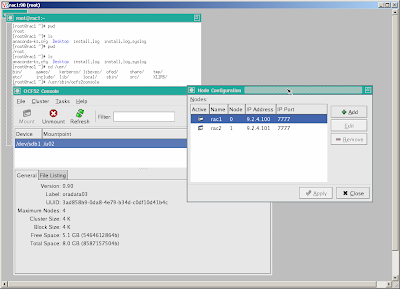
To create a configuration run ocfs2console and follow GUI menu
[root@rac2 ~]# /usr/sbin/ocfs2consoleDefine a configuration of two nodes rac1, rac2 using IP on private NIC en1 and specified port
 Propagate the configuration to other node
  Create and format cluster file system, note that we shall create a cluster filesystem on a shared disk, that is accessible from both nodes.
 [root@rac1 ~]#fdisk /dev/sdb ... #create single partition sdb1 ...Use ocfs2console=>task=>format /dev/sdb1
 Start OCFS2 services and mount cluster file system at startup
 [root@rac[1,2] ~]#chkconfig --add o2cb [root@rac[1,2] ~]#chkconfig --add ocfs2 [root@rac[1,2] ~]#/etc/init.d/o2cb configure [root@rac[1,2] ~]#cat /etc/fstab: ... /dev/sdb1 /u02 ocfs2 rw,_netdev,datavolume,nointr,heartbeat=local 0 0 [root@rac[1,2] ~]#mkdir /u02 [root@rac[1,2] ~]#mount /u02Verify cluster file system by creating a directory on one node and check if it appears on other node.
[root@rac1~]#mkdir –p /u02/crsdata
[root@rac1~]#mkdir –p /u02/oradata
[root@rac2~]#ls –l /u02
crsdata
oradata
Modify LINUX kernel setting to meet OCRS,and ORACLE requirements
For the first node
[root@rac1]~]# vi /etc/sysctl.conf
kernel.shmall = 2097152
kernel.shmmax = 2147483648
kernel.shmmni = 4096
# semaphores: semmsl, semmns, semopm, semmni
kernel.sem = 250 32000 100 128
fs.file-max = 65536
net.ipv4.ip_local_port_range = 1024 65000
net.core.rmem_default=262144
net.core.rmem_max=262144
net.core.wmem_default=262144
net.core.wmem_max=262144
[root@rac1~]# sysctl -p
[root@rac1]~]# vi /etc/modprobe.conf
options hangcheck-timer hangcheck_tick=30 hangcheck_margin=180
For the second node
[root@rac2~]# vi /etc/sysctl.conf
kernel.shmall = 2097152
kernel.shmmax = 2147483648
kernel.shmmni = 4096
# semaphores: semmsl, semmns, semopm, semmni
kernel.sem = 250 32000 100 128
fs.file-max = 65536
net.ipv4.ip_local_port_range = 1024 65000
net.core.rmem_default=262144
net.core.rmem_max=262144
net.core.wmem_default=262144
net.core.wmem_max=262144
[root@rac2~]# sysctl -p
[root@rac2]~]# vi /etc/modprobe.conf
options hangcheck-timer hangcheck_tick=30 hangcheck_margin=180
Install Oracle Cluster Ready Service - CRS
Create the new groups and users.
[root@rac[1,2]~]#useradd oracle
[root@rac[1,2]~]#groupadd oinstall
[root@rac[1,2]~]#groupadd dba
[root@rac[1,2]~]#usermod -g oinstall -G dba oracle
Create Oracle Cluster Registry - OCR and votedisk on cluster file system
[root@rac1~]#mkdir –p /u02/crsdata
[root@rac1~]#touch /u02/crsdata/ocr.dbf
[root@rac1~]#touch /u02/crsdata/votedisk.dbf
[root@rac1~]#chown –R oracle /u02
Copy installation software
[root@rac1~]#mkdir –p /u02/setup/clusterware10.2.0.1
[root@rac1~]#mkdir –p /u02/setup/oracle10.2.0.1
[root@rac1~]#mkdir –p /u02/setup/patch10.2.0.4
Create home directory for crs and oracle
[root@rac1~]#mkdir –p /u01/crs
[root@rac1~]#mkdir –p /u01/oracle
[root@rac1~]#chown –R oracle /u01
Run Oracle Universal Installer - OUI as oracle
[oracle@rac1~]$/u02/setup/clusterware/runInstaller
 Follow instructions and
 - add node rac2 to make sure that there are two nodes in the cluster - for each node specify public node name (rac1, rac2), virtual host name (rac1-vip, rac2-vip) and private node name (rac1-priv, rac2-priv), this is also important to specify an IP of a reliable host of the same public network as gateway.
- specify public network for public and virtual IP and private network for private IP
- specify u02/crsdata/ocr.dbf as OCR and /u02/crsdata/votedisk.dbf as voting disk location and external redundancy OUI will perform installation on one node then using RSH to copy to other node, during final phase of the installation process, script root.sh shall be invoked manually as root on each node.
At the end, OUI will run virtual IP configuration assistant - VIPCA, that create and persist configuration of VIP, ONS and GSD etc. as resource in OCR.
If for any reason (e.g. mis typing, incorrect IP) VIPCA fails, we can re run it under root after correction.
Install Oracle Database Software and create a database
The installation of Oracle Database Software is similar as for non-RAC version, only different is after completion on one node, the OUI will copy the software to other node.
At the end of this process two configuration programs will be invoked
- a database configuration assistant - DBCA for database creation and
- a network configuration assistant - NETCA for listener and tnsname configuration
Thursday, August 28, 2008
Difference between Remittance and Transfer
In financial industries, 'Remittance' refers to an action of sending money from an individual to other not being resulted from either sale and transfer of good and funds. 'Transfer' generally refers to an action of sending money from a party to other as payment for a good or service.
E.g. CitiBank Japan have different charge for remittance and transfer
E.g. CitiBank Japan have different charge for remittance and transfer

Friday, August 8, 2008
Calling RMI from EJB Stateless Session Bean
I have to analyze one of our J2EE application(s), that call RMI from a Stateless Session Bean. I originally think that it could be a problem, because our Session Bean use remote object as singleton and the rule said that Session Bean shall be programed in thread safe manner because its methods run concurrently within container's threads. To confirm that I decided to do some experiments.
I create a sample RMI server
I create a sample RMI server
/* SampleServer.java */
import java.rmi.*;

public interface SampleServer extends Remote
{
  public int sum(int a,int b) throws RemoteException;
}

import java.rmi.*;
import java.rmi.server.*;
import java.rmi.registry.*;

/* SampleServerImpl.java */
public class SampleServerImpl extends UnicastRemoteObject
                             implements SampleServer
{
  SampleServerImpl() throws RemoteException
  {
     super();
  }

  public int sum(int a,int b) throws RemoteException
  {
     try {
       Thread.sleep(5000);
     } catch (InterruptedException e){
       e.printStackTrace();
     }

     return a + b;
  }

  public static void main(String args[])
  {
    try
      {
        SampleServerImpl sampleServer = new SampleServerImpl();

        Registry registry = LocateRegistry.createRegistry(8989);
        registry.rebind("Sample", sampleServer);

        System.out.println("Server waiting.....");
      }
    catch (RemoteException e)
      {
         e.printStackTrace();
      }
  }
}
I compile these classes compile and run using JDK1.5 with jmx enabled according jconsole article
$ javac SampleServer.java SampleServerImpl.java
$ rmic SampleServerImpl
$ java -Dcom.sun.management.jmxremote SampleServerImpl
I decide to use JRUBY to create and run a 20 thread(s), each issue a call RMI server
$jirb
> import java.rmi.Naming
> sample = Naming.lookup("//127.0.0.1:8989/Sample")
> (1..20).each { Thread.new { puts sample.sum(3,7)} }
>
Then I run jconsole supplied in JDK1.5 and watch thread pool of the RMI server
$jconsoleThe result is everything is OK, for each incoming call request, RMI server create a separate thread to handle it and the thread is dropped after it completion.
Wednesday, July 9, 2008
Joining ING Direct Japan
I have given a resignation letter to the CEO of CSE, the company that I worked for 11 years. Officially I will join ING Direct Japan at the end of August and will move to Tokyo.
Taking such decision is not easy, CSE is not just my workplace, it is part of my life, where I put a lot of my desire and hope. These past 11 years was rewarding and I never regret of the decision to move from Prague to Hanoi in 1997. But it is time to change.
If anyone have chance to be in Tokyo, don't forget to drop me a e-mail, I will be pleased to go with you for a drink.
Taking such decision is not easy, CSE is not just my workplace, it is part of my life, where I put a lot of my desire and hope. These past 11 years was rewarding and I never regret of the decision to move from Prague to Hanoi in 1997. But it is time to change.
If anyone have chance to be in Tokyo, don't forget to drop me a e-mail, I will be pleased to go with you for a drink.
Saturday, May 10, 2008
Faster jruby startup
One of issue with JRuby and Java in general is long startup time. As the result, a lot of peoples including myself use MRI when developing application and then use JRuby to test and run the application.
Recent change is jruby shell script have improved startup time at significantly by putting JRuby library into java boot classpath (using -Xbootclasspath/a:) instead of normal classpath to bypass java class verification, however it still so slow compare to MRI.
Below is a simple test on machine
1. jruby lib in classpath
Recent change is jruby shell script have improved startup time at significantly by putting JRuby library into java boot classpath (using -Xbootclasspath/a:) instead of normal classpath to bypass java class verification, however it still so slow compare to MRI.
Below is a simple test on machine
1. jruby lib in classpath
huy@huy-desktop:/u01/jruby-1.1.1/bin$ time jruby -e "puts 'hello world'"
hello world

real    0m2.934s
user    0m2.604s
sys     0m0.136s
2. jruby lib in boot classpath
huy@huy-desktop:/u01/jruby-1.1.1/bin$ time jruby -e "puts 'hello world'"
hello world

real    0m1.124s
user    0m0.896s
sys     0m0.072s
3. MRI
huy@huy-desktop:/u01/jruby-1.1.1/bin$ time ruby -e "puts 'hello world'"
hello world

real    0m0.060s
user    0m0.004s
sys     0m0.004s
Subscribe to:
Posts (Atom)