If you are looking for RPM package(s) for LINUX, then you should look at this site http://linuxsoft.cern.ch/. The binary rpm package are built from source SRPM available in http://ftp.redhat.com/pub/redhat/linux/enterprise/. They are well organized, complete and updated. The slc4X directory is equivalent to RedHat ES/AS 4 while slc5X to RedHat ES/AS 5.
If you have not RedHat Linux media in hand for what ever reason, this is definitely a good help.
Thursday, October 30, 2008


Tuesday, September 9, 2008
First few days in ING Direct Japan
The first day was just for formality. I was given temporary access card (RFID card), seat and account to access the company computer. Then a lady from IT team took me to the local ward office for alien card registration and to local bank (Shinsei) to open a account to which the company can pay me.
The second day is workshop on kind corporate value and culture , they called it Orange value, where we listened to the CEO speed of ING group system of value, did self introduction, play game, conduct group discussion organized by external consultant.
The second day is workshop on kind corporate value and culture , they called it Orange value, where we listened to the CEO speed of ING group system of value, did self introduction, play game, conduct group discussion organized by external consultant.
Thursday, September 4, 2008
Testing Oracle Real Application Cluster
Installation and configuration of Oracle RAC is always challenging task even for an experienced dba.
I read a story saying that a database administrator will laugh at you if you ask him to create a workable RAC of 2 nodes within a week.
Oracle RAC is definitely complex environment but is it so difficult and time consuming to deploy ?
To find an answer, I decided to try install Oracle RAC 10.2 on my small computer with 2 GB RAM. I used VMWARE server to create the environment of 2 linux nodes, that concurrently access shared database on cluster file system OCFS2.
I took me not one week but nearly 4 day(s), during which, I have solved various encountered problems. Below are some notes that you need to consider before attempting similarly
Documentation
http://www.oracle-base.com/articles/rac/ArticlesRac.php
http://www.dbasupport.com/oracle/ora10g/index_RAC.shtml These two freely available resources are quite good, concise and practical beside metalink and official manual.
Summary of problems
Believe or not, the fact is that most of problems are rooted from
- mis-configuration of hardware and OS: without time synchronization between nodes, Clusterware misbehaves
- not install latest patch: many things suddenly work after installing latest patch
Oracle RAC document is generally not good
- it is huge and verbose: the Oracle Clusterware and Oracle Real Application Clusters Administration and Deployment Guide 10g Release 2 (P/N: B14197-08) is 400 pages thick
- knowledge is split across many metalink notes making it difficult in orientation: to understand why we need proper setting of default gateway for a public network interface and its role, we need search metalink more than once
- It is usually difficult and expensive to create environment for practical testing
The RAC software stack
RAC Software stack consists of 2 layers sitting on top of OS
a. RDBMS: Oracle RDBMS with RAC as Option
b. Clusterware: CRS – Cluster Ready Service
c. Operating System: Linux, Windows, AIX
By implementing CRS component to play a role of Clusterware, Oracle wants to remove dependency of RAC from Clusterware traditionally provided OS and third party vendor.
CRS need two device(s)/file(s) to store it's data; voting disk and oracle cluster registry - OCR . Because only one CRS is needed to support multi database(s), it is good to keep voting disk and OCR in a location independent from location for a database files.
VMWARE Server configuration
To experiment with Oracle Clusterware, also called Cluster Ready Service (CRS) and RAC, we need VMWARE Server. VMWARE Workstation does not work because it does not support concurrent access to a share disk.
The config file (*.vmx) of each node shall be specially modified to disable disk locking and cache. By doing it, a hard disk created as file on host system can be safely attached to 2 VMWARE nodes. An example of special setting is taken from Oracle RAC Installation on VMWARE article given below
RAC requires at least 2 NIC per node, one for private network and one for public network. Private network is used for communication between nodes while public network is for serving clients.
In case of public network RAC does not use the host IP address for client communication but what it calls service or virtual IP address (VIP). In the public network, the VIP address has the same netmask as the host IP address, it is managed (assigned/un-assigned to the NIC) by Cluster Ready Service - CRS so in case of failure of one node, the VIP address of the fail node will be move to surviving one by CRS.
It is good to follow some naming convention for host name. Example is given below
Enabling remote shell (RSH) and login (RLOGIN)
Oracle Universal Installer (OUI) uses RSH and RLOGIN to install software on multi nodes, which means we run OUI only on one node and it will automatically copy the software (CRS and RAC) and configure on other nodes. Other configuration programs as VIPCA, NETCA and DBCA also work similarly and depend on RSH and RLOGIN to perform remote operation.
Therefore we need to enable RSH and RLOGIN on all nodes before running installation program. The example below demonstrate how to enable RSH and RLOGIN.
Configure RSH
Oracle clusterware CRS use time from nodes for it activities, so keeping time synchronized on all nodes is required. The clock synchronization method on unix is using NTP services, in which a machine contact other with preciser clock a reference clock, on regular interval to retrieve time and update its own clock.
In the following example, node rac1 is used as reference clock while rac2 use rac1 as it's reference clock. Sometime this configuration does work well due to the reason that VMWARE hypervisor provide very bad clock implementation, therefore it is recommended to use an external physical server as reference clock , if we can have connection to Internet then use one of available real reference clocks.
CRS communication between nodes happens via TCP and UDP, so it is important to turn off firewall in all nodes to allow inter nodes traffic.
RAC use shared disk architecture, in which all nodes have to access (for both read and write) to a same collection of database and others files located in a external hard disk. There are few options, one is to keep these files on raw devices, which is usually quite painful due to it's complex administration ranging from creation to maintenance. Other option is store them on file system, because traditional unix file system don't allow access from multi nodes, we need a special one, a cluster file system. There are different cluster file system available for different OS, e.g. GFS on AIX, Oracle has implemented a cluster file system on LINUX called OCFS2.
Install OCFS2 is fairly simple and easy
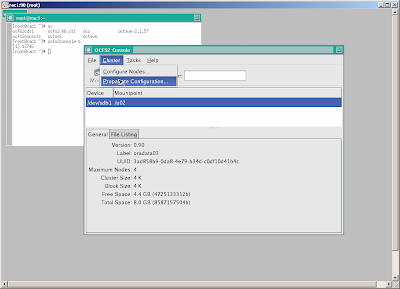
 Propagate the configuration to other node
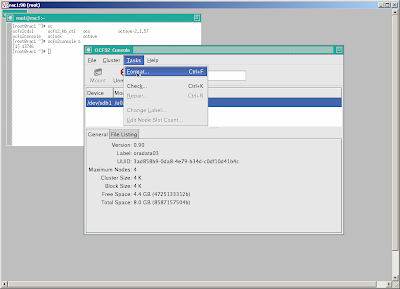
 Create and format cluster file system, note that we shall create a cluster filesystem on a shared disk, that is accessible from both nodes.
 Start OCFS2 services and mount cluster file system at startup
For the first node
Create the new groups and users.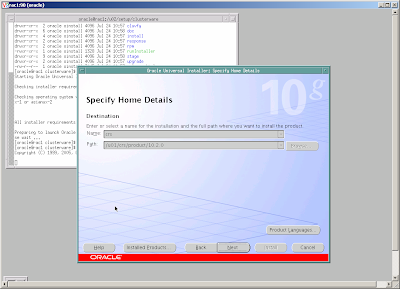 Follow instructions and
- add node rac2 to make sure that there are two nodes in the cluster - for each node specify public node name (rac1, rac2), virtual host name (rac1-vip, rac2-vip) and private node name (rac1-priv, rac2-priv), this is also important to specify an IP of a reliable host of the same public network as gateway.
- specify public network for public and virtual IP and private network for private IP
- specify u02/crsdata/ocr.dbf as OCR and /u02/crsdata/votedisk.dbf as voting disk location and external redundancy OUI will perform installation on one node then using RSH to copy to other node, during final phase of the installation process, script root.sh shall be invoked manually as root on each node.
At the end, OUI will run virtual IP configuration assistant - VIPCA, that create and persist configuration of VIP, ONS and GSD etc. as resource in OCR.
If for any reason (e.g. mis typing, incorrect IP) VIPCA fails, we can re run it under root after correction.
Install Oracle Database Software and create a database
The installation of Oracle Database Software is similar as for non-RAC version, only different is after completion on one node, the OUI will copy the software to other node.
At the end of this process two configuration programs will be invoked
- a database configuration assistant - DBCA for database creation and
- a network configuration assistant - NETCA for listener and tnsname configuration
I read a story saying that a database administrator will laugh at you if you ask him to create a workable RAC of 2 nodes within a week.
Oracle RAC is definitely complex environment but is it so difficult and time consuming to deploy ?
To find an answer, I decided to try install Oracle RAC 10.2 on my small computer with 2 GB RAM. I used VMWARE server to create the environment of 2 linux nodes, that concurrently access shared database on cluster file system OCFS2.
I took me not one week but nearly 4 day(s), during which, I have solved various encountered problems. Below are some notes that you need to consider before attempting similarly
Documentation
http://www.oracle-base.com/articles/rac/ArticlesRac.php
http://www.dbasupport.com/oracle/ora10g/index_RAC.shtml These two freely available resources are quite good, concise and practical beside metalink and official manual.
Summary of problems
Believe or not, the fact is that most of problems are rooted from
- mis-configuration of hardware and OS: without time synchronization between nodes, Clusterware misbehaves
- not install latest patch: many things suddenly work after installing latest patch
Oracle RAC document is generally not good
- it is huge and verbose: the Oracle Clusterware and Oracle Real Application Clusters Administration and Deployment Guide 10g Release 2 (P/N: B14197-08) is 400 pages thick
- knowledge is split across many metalink notes making it difficult in orientation: to understand why we need proper setting of default gateway for a public network interface and its role, we need search metalink more than once
- It is usually difficult and expensive to create environment for practical testing
The RAC software stack
RAC Software stack consists of 2 layers sitting on top of OS
a. RDBMS: Oracle RDBMS with RAC as Option
b. Clusterware: CRS – Cluster Ready Service
c. Operating System: Linux, Windows, AIX
By implementing CRS component to play a role of Clusterware, Oracle wants to remove dependency of RAC from Clusterware traditionally provided OS and third party vendor.
CRS need two device(s)/file(s) to store it's data; voting disk and oracle cluster registry - OCR . Because only one CRS is needed to support multi database(s), it is good to keep voting disk and OCR in a location independent from location for a database files.
VMWARE Server configuration
To experiment with Oracle Clusterware, also called Cluster Ready Service (CRS) and RAC, we need VMWARE Server. VMWARE Workstation does not work because it does not support concurrent access to a share disk.
The config file (*.vmx) of each node shall be specially modified to disable disk locking and cache. By doing it, a hard disk created as file on host system can be safely attached to 2 VMWARE nodes. An example of special setting is taken from Oracle RAC Installation on VMWARE article given below
...
...
disk.locking = "FALSE"
diskLib.dataCacheMaxSize = "0"
diskLib.dataCacheMaxReadAheadSize = "0"
diskLib.dataCacheMinReadAheadSize = "0"
diskLib.dataCachePageSize = "4096"
diskLib.maxUnsyncedWrites = "0"

scsi1.present = "TRUE"
scsi1.virtualDev = "lsilogic"
scsi1.sharedBus = "VIRTUAL"
...
...
Network setting
RAC requires at least 2 NIC per node, one for private network and one for public network. Private network is used for communication between nodes while public network is for serving clients.
In case of public network RAC does not use the host IP address for client communication but what it calls service or virtual IP address (VIP). In the public network, the VIP address has the same netmask as the host IP address, it is managed (assigned/un-assigned to the NIC) by Cluster Ready Service - CRS so in case of failure of one node, the VIP address of the fail node will be move to surviving one by CRS.
It is good to follow some naming convention for host name. Example is given below
/etc/hosts
# public
190.2.4.100             rac1 rac1-en0
190.2.4.101             rac2 rac2-en0

# private
9.2.4.100               rac1-priv rac1-en1
9.2.4.101               rac2-priv rac2-en1

# virtual
190.2.4.200             rac1-vip
190.2.4.201             rac2-vip
CRS need a gateway assigned to a public network interface in order to reliably detect failure of NIC and node. It is important to use a IP of a live machine reachable from all nodes but it is not necessarily a gateway.
Enabling remote shell (RSH) and login (RLOGIN)
Oracle Universal Installer (OUI) uses RSH and RLOGIN to install software on multi nodes, which means we run OUI only on one node and it will automatically copy the software (CRS and RAC) and configure on other nodes. Other configuration programs as VIPCA, NETCA and DBCA also work similarly and depend on RSH and RLOGIN to perform remote operation.
Therefore we need to enable RSH and RLOGIN on all nodes before running installation program. The example below demonstrate how to enable RSH and RLOGIN.
Configure RSH
[root@rac1 ~]# rpm -q -a | grep rsh
rsh-0.17-25.4
rsh-server-0.17-25.4

[root@rac1 ~]# cat /etc/xinetd.d/rsh
# default: on
# description: The rshd server is the server for the rcmd(3) routine and, \
#       consequently, for the rsh(1) program.  The server provides \
#       remote execution facilities with authentication based on \
#       privileged port numbers from trusted hosts.
service shell
{
        disable = no
        socket_type             = stream
        wait                    = no
        user                    = root
        log_on_success          += USERID
        log_on_failure          += USERID
        server                  = /usr/sbin/in.rshd
}
Configure RLOGIN
[root@rac1 ~]# cat /etc/xinetd.d/rlogin
# default: on
# description: rlogind is the server for the rlogin(1) program.  The server \
#       provides a remote login facility with authentication based on \
#       privileged port numbers from trusted hosts.
service login
{
        disable = no
        socket_type             = stream
        wait                    = no
        user                    = root
        log_on_success          += USERID
        log_on_failure          += USERID
        server                  = /usr/sbin/in.rlogind
}
Start RSH and RLOGIN
[root@rac2 ~]# chkconfig rsh on
[root@rac2 ~]# chkconfig rlogin on
[root@rac2 ~]# service xinetd reload
Create oracle account and enable RSH and RLOGIN for oracle on node rac1 and rac2
#Create the /etc/hosts.equiv file as the root user.
[root@rac2 ~]# touch /etc/hosts.equiv
[root@rac2 ~]# useradd oracle
[root@rac1 ~]# useradd oracle

[root@rac[1,2] ~]# cat /etc/hosts.equiv
+rac1 oracle
+rac2 oracle
+rac1-priv oracle
+rac2-priv oracle
+rac1-vip oracle
+rac2-vip oracle

[root@rac[1,2] ~]# chmod 600 /etc/hosts.equiv
[root@rac[1,2] ~]# chown root:root /etc/hosts.equiv
Verify RSH and RLOGIN
[oracle@rac2 ~]$ rsh rac1 “uname –a”
[oracle@rac1 ~]$ rsh rac2 “uname –a”
[oracle@rac1 ~]$ rlogin rac2
[oracle@rac2 ~]$ rlogin rac1
Configure Network Time Protocol - NTP
Oracle clusterware CRS use time from nodes for it activities, so keeping time synchronized on all nodes is required. The clock synchronization method on unix is using NTP services, in which a machine contact other with preciser clock a reference clock, on regular interval to retrieve time and update its own clock.
In the following example, node rac1 is used as reference clock while rac2 use rac1 as it's reference clock. Sometime this configuration does work well due to the reason that VMWARE hypervisor provide very bad clock implementation, therefore it is recommended to use an external physical server as reference clock , if we can have connection to Internet then use one of available real reference clocks.
[root@rac1 ~]# more /etc/ntp.conf
server  127.127.1.0     # local clock
fudge   127.127.1.0 stratum 10 refid LCL

[root@rac1 ~]# /etc/init.d/ntpd restart
Shutting down ntpd:                                        [  OK  ]
Starting ntpd:                                             [  OK  ]
[root@rac1 ~]# chkconfig ntpd on

[root@rac2 ~]# more /etc/ntp.conf
server  rac1     # remote clock

[root@rac2 ~]# /etc/init.d/ntpd restart
Shutting down ntpd:                                        [  OK  ]
Starting ntpd:                                             [  OK  ]

[root@rac2 ~]# chkconfig ntpd on

[root@rac2 ~]# /usr/sbin/ntpdate -v -d rac1 # verify reference clock rac1
Turn off firewall
CRS communication between nodes happens via TCP and UDP, so it is important to turn off firewall in all nodes to allow inter nodes traffic.
[root@rac1 ~]# /etc/init.d/iptable stop
[root@rac1 ~]# chkconfig iptable off
[root@rac2 ~]# /etc/init.d/iptable stop
[root@rac2 ~]# chkconfig iptable off
Install, configure cluster file system - OCFS2
RAC use shared disk architecture, in which all nodes have to access (for both read and write) to a same collection of database and others files located in a external hard disk. There are few options, one is to keep these files on raw devices, which is usually quite painful due to it's complex administration ranging from creation to maintenance. Other option is store them on file system, because traditional unix file system don't allow access from multi nodes, we need a special one, a cluster file system. There are different cluster file system available for different OS, e.g. GFS on AIX, Oracle has implemented a cluster file system on LINUX called OCFS2.
Install OCFS2 is fairly simple and easy
[root@rac1 ~]# rpm -q -a | grep ocfs2
ocfs2-2.6.9-42.ELsmp-1.2.9-1.el4
ocfs2-tools-1.2.7-1.el4
ocfs2console-1.2.7-1.el4

[root@rac2 ~]# rpm -q -a | grep ocfs2
ocfs2-2.6.9-42.ELsmp-1.2.9-1.el4
ocfs2-tools-1.2.7-1.el4
ocfs2console-1.2.7-1.el4
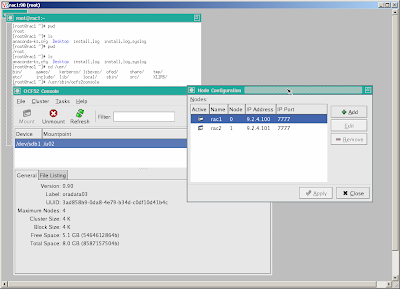
To create a configuration run ocfs2console and follow GUI menu
[root@rac2 ~]# /usr/sbin/ocfs2consoleDefine a configuration of two nodes rac1, rac2 using IP on private NIC en1 and specified port
 Propagate the configuration to other node
  Create and format cluster file system, note that we shall create a cluster filesystem on a shared disk, that is accessible from both nodes.
 [root@rac1 ~]#fdisk /dev/sdb ... #create single partition sdb1 ...Use ocfs2console=>task=>format /dev/sdb1
 Start OCFS2 services and mount cluster file system at startup
 [root@rac[1,2] ~]#chkconfig --add o2cb [root@rac[1,2] ~]#chkconfig --add ocfs2 [root@rac[1,2] ~]#/etc/init.d/o2cb configure [root@rac[1,2] ~]#cat /etc/fstab: ... /dev/sdb1 /u02 ocfs2 rw,_netdev,datavolume,nointr,heartbeat=local 0 0 [root@rac[1,2] ~]#mkdir /u02 [root@rac[1,2] ~]#mount /u02Verify cluster file system by creating a directory on one node and check if it appears on other node.
[root@rac1~]#mkdir –p /u02/crsdata
[root@rac1~]#mkdir –p /u02/oradata
[root@rac2~]#ls –l /u02
crsdata
oradata
Modify LINUX kernel setting to meet OCRS,and ORACLE requirements
For the first node
[root@rac1]~]# vi /etc/sysctl.conf
kernel.shmall = 2097152
kernel.shmmax = 2147483648
kernel.shmmni = 4096
# semaphores: semmsl, semmns, semopm, semmni
kernel.sem = 250 32000 100 128
fs.file-max = 65536
net.ipv4.ip_local_port_range = 1024 65000
net.core.rmem_default=262144
net.core.rmem_max=262144
net.core.wmem_default=262144
net.core.wmem_max=262144
[root@rac1~]# sysctl -p
[root@rac1]~]# vi /etc/modprobe.conf
options hangcheck-timer hangcheck_tick=30 hangcheck_margin=180
For the second node
[root@rac2~]# vi /etc/sysctl.conf
kernel.shmall = 2097152
kernel.shmmax = 2147483648
kernel.shmmni = 4096
# semaphores: semmsl, semmns, semopm, semmni
kernel.sem = 250 32000 100 128
fs.file-max = 65536
net.ipv4.ip_local_port_range = 1024 65000
net.core.rmem_default=262144
net.core.rmem_max=262144
net.core.wmem_default=262144
net.core.wmem_max=262144
[root@rac2~]# sysctl -p
[root@rac2]~]# vi /etc/modprobe.conf
options hangcheck-timer hangcheck_tick=30 hangcheck_margin=180
Install Oracle Cluster Ready Service - CRS
Create the new groups and users.
[root@rac[1,2]~]#useradd oracle
[root@rac[1,2]~]#groupadd oinstall
[root@rac[1,2]~]#groupadd dba
[root@rac[1,2]~]#usermod -g oinstall -G dba oracle
Create Oracle Cluster Registry - OCR and votedisk on cluster file system
[root@rac1~]#mkdir –p /u02/crsdata
[root@rac1~]#touch /u02/crsdata/ocr.dbf
[root@rac1~]#touch /u02/crsdata/votedisk.dbf
[root@rac1~]#chown –R oracle /u02
Copy installation software
[root@rac1~]#mkdir –p /u02/setup/clusterware10.2.0.1
[root@rac1~]#mkdir –p /u02/setup/oracle10.2.0.1
[root@rac1~]#mkdir –p /u02/setup/patch10.2.0.4
Create home directory for crs and oracle
[root@rac1~]#mkdir –p /u01/crs
[root@rac1~]#mkdir –p /u01/oracle
[root@rac1~]#chown –R oracle /u01
Run Oracle Universal Installer - OUI as oracle
[oracle@rac1~]$/u02/setup/clusterware/runInstaller
 Follow instructions and
 - add node rac2 to make sure that there are two nodes in the cluster - for each node specify public node name (rac1, rac2), virtual host name (rac1-vip, rac2-vip) and private node name (rac1-priv, rac2-priv), this is also important to specify an IP of a reliable host of the same public network as gateway.
- specify public network for public and virtual IP and private network for private IP
- specify u02/crsdata/ocr.dbf as OCR and /u02/crsdata/votedisk.dbf as voting disk location and external redundancy OUI will perform installation on one node then using RSH to copy to other node, during final phase of the installation process, script root.sh shall be invoked manually as root on each node.
At the end, OUI will run virtual IP configuration assistant - VIPCA, that create and persist configuration of VIP, ONS and GSD etc. as resource in OCR.
If for any reason (e.g. mis typing, incorrect IP) VIPCA fails, we can re run it under root after correction.
Install Oracle Database Software and create a database
The installation of Oracle Database Software is similar as for non-RAC version, only different is after completion on one node, the OUI will copy the software to other node.
At the end of this process two configuration programs will be invoked
- a database configuration assistant - DBCA for database creation and
- a network configuration assistant - NETCA for listener and tnsname configuration
Thursday, August 28, 2008
Difference between Remittance and Transfer
In financial industries, 'Remittance' refers to an action of sending money from an individual to other not being resulted from either sale and transfer of good and funds. 'Transfer' generally refers to an action of sending money from a party to other as payment for a good or service.
E.g. CitiBank Japan have different charge for remittance and transfer
E.g. CitiBank Japan have different charge for remittance and transfer

Friday, August 8, 2008
Calling RMI from EJB Stateless Session Bean
I have to analyze one of our J2EE application(s), that call RMI from a Stateless Session Bean. I originally think that it could be a problem, because our Session Bean use remote object as singleton and the rule said that Session Bean shall be programed in thread safe manner because its methods run concurrently within container's threads. To confirm that I decided to do some experiments.
I create a sample RMI server
I create a sample RMI server
/* SampleServer.java */
import java.rmi.*;

public interface SampleServer extends Remote
{
  public int sum(int a,int b) throws RemoteException;
}

import java.rmi.*;
import java.rmi.server.*;
import java.rmi.registry.*;

/* SampleServerImpl.java */
public class SampleServerImpl extends UnicastRemoteObject
                             implements SampleServer
{
  SampleServerImpl() throws RemoteException
  {
     super();
  }

  public int sum(int a,int b) throws RemoteException
  {
     try {
       Thread.sleep(5000);
     } catch (InterruptedException e){
       e.printStackTrace();
     }

     return a + b;
  }

  public static void main(String args[])
  {
    try
      {
        SampleServerImpl sampleServer = new SampleServerImpl();

        Registry registry = LocateRegistry.createRegistry(8989);
        registry.rebind("Sample", sampleServer);

        System.out.println("Server waiting.....");
      }
    catch (RemoteException e)
      {
         e.printStackTrace();
      }
  }
}
I compile these classes compile and run using JDK1.5 with jmx enabled according jconsole article
$ javac SampleServer.java SampleServerImpl.java
$ rmic SampleServerImpl
$ java -Dcom.sun.management.jmxremote SampleServerImpl
I decide to use JRUBY to create and run a 20 thread(s), each issue a call RMI server
$jirb
> import java.rmi.Naming
> sample = Naming.lookup("//127.0.0.1:8989/Sample")
> (1..20).each { Thread.new { puts sample.sum(3,7)} }
>
Then I run jconsole supplied in JDK1.5 and watch thread pool of the RMI server
$jconsoleThe result is everything is OK, for each incoming call request, RMI server create a separate thread to handle it and the thread is dropped after it completion.
Wednesday, July 9, 2008
Joining ING Direct Japan
I have given a resignation letter to the CEO of CSE, the company that I worked for 11 years. Officially I will join ING Direct Japan at the end of August and will move to Tokyo.
Taking such decision is not easy, CSE is not just my workplace, it is part of my life, where I put a lot of my desire and hope. These past 11 years was rewarding and I never regret of the decision to move from Prague to Hanoi in 1997. But it is time to change.
If anyone have chance to be in Tokyo, don't forget to drop me a e-mail, I will be pleased to go with you for a drink.
Taking such decision is not easy, CSE is not just my workplace, it is part of my life, where I put a lot of my desire and hope. These past 11 years was rewarding and I never regret of the decision to move from Prague to Hanoi in 1997. But it is time to change.
If anyone have chance to be in Tokyo, don't forget to drop me a e-mail, I will be pleased to go with you for a drink.
Saturday, May 10, 2008
Faster jruby startup
One of issue with JRuby and Java in general is long startup time. As the result, a lot of peoples including myself use MRI when developing application and then use JRuby to test and run the application.
Recent change is jruby shell script have improved startup time at significantly by putting JRuby library into java boot classpath (using -Xbootclasspath/a:) instead of normal classpath to bypass java class verification, however it still so slow compare to MRI.
Below is a simple test on machine
1. jruby lib in classpath
Recent change is jruby shell script have improved startup time at significantly by putting JRuby library into java boot classpath (using -Xbootclasspath/a:) instead of normal classpath to bypass java class verification, however it still so slow compare to MRI.
Below is a simple test on machine
1. jruby lib in classpath
huy@huy-desktop:/u01/jruby-1.1.1/bin$ time jruby -e "puts 'hello world'"
hello world

real    0m2.934s
user    0m2.604s
sys     0m0.136s
2. jruby lib in boot classpath
huy@huy-desktop:/u01/jruby-1.1.1/bin$ time jruby -e "puts 'hello world'"
hello world

real    0m1.124s
user    0m0.896s
sys     0m0.072s
3. MRI
huy@huy-desktop:/u01/jruby-1.1.1/bin$ time ruby -e "puts 'hello world'"
hello world

real    0m0.060s
user    0m0.004s
sys     0m0.004s
Tuesday, April 15, 2008
Why Python
I known Python during the time I read the book "Test-Driven Development By Example". It is dynamic programming language like Ruby. However I don't like that language as Ruby because of it's syntax, missing open classes, having difficult meta programming style, etc..
I get attention of Python after recent release of Google AppEngine, a combination of web framework written in Python with hosting service. Google AppEngine allows us to develop application in our machine then upload to Google hosting service and benefit from Google Infrastructure including identity management, Google datastore, scalability on demand, etc. . Google AppEngine is now available only for Python developers, they are many so within few hours from announcement of Google AppEngine, the first free 10,000 accounts has gone.
Python has additional good characteristics to be considered as language on new projects:
- Python can compile program to byte code so it has reputation of better performance then Ruby.
- In addition to C implementation, Python has already quite mature .Net and Java implementation, which can be very strong arguments in any integration projects.
- Python has proven track on scalable web site like Google or framework as Django , Zope or application as ERP5
I get attention of Python after recent release of Google AppEngine, a combination of web framework written in Python with hosting service. Google AppEngine allows us to develop application in our machine then upload to Google hosting service and benefit from Google Infrastructure including identity management, Google datastore, scalability on demand, etc. . Google AppEngine is now available only for Python developers, they are many so within few hours from announcement of Google AppEngine, the first free 10,000 accounts has gone.
Python has additional good characteristics to be considered as language on new projects:
- Python can compile program to byte code so it has reputation of better performance then Ruby.
- In addition to C implementation, Python has already quite mature .Net and Java implementation, which can be very strong arguments in any integration projects.
- Python has proven track on scalable web site like Google or framework as Django , Zope or application as ERP5
Friday, February 22, 2008
Sunday, January 20, 2008
Using git for newbie
I am doing some experiment with Rubinius code base, which uses distributed SCM git. Comparing with Subversion, Git is a little bit more difficult, so It takes me a while to understand its commands and find the proper way to work with it. Without commit right, here are typical commands I use in my work flow.
Clone a remote repository into the local disk - repository is create as a clone of the remote repository identified by a given url
Create new branch
Delete branch - we can remove unused branch if it is no longer needed
git pull will perform merge change on remote branch to local branch
Revert change - switch to branch named 'master' and revert back directory tree in original state, all changes are lost
Clone a remote repository into the local disk - repository is create as a clone of the remote repository identified by a given url
git clone git://git.rubini.us/code
cd code # goto directory containing local repository
git config user.name "le huy"  #configure your name
git config user.email "lehuy20@gmail.com" #and email that will be used when committing
Sample .git/config - git create a .git directory to store it's data, file .git/config contains configuration data including remote repository, which remote branch is link with which local one
cat .git/config
[core]
        repositoryformatversion = 0
        filemode = true
        bare = false
        logallrefupdates = true
[remote "origin"]
        url = git://github.com/evanphx/rubinius.git
        fetch = +refs/heads/*:refs/remotes/origin/*
[gui]
        geometry = 885x450+5+65 399 192
[branch "master"]
        remote = origin
        merge = refs/heads/master
[branch "cpp"]
        remote = origin
        merge = refs/heads/cpp
Submodule - git submodule is used to link to external repository (equivalent to subversion extern)
cat .gitmodules
[submodule "mspec"]
        path = mspec
        url = git://github.com/brixen/mspec.git
[submodule "spec/frozen"]
        path = spec/frozen
        url = git://github.com/brixen/rubyspec.git
init and update submodule from external repository
git submodule init # init submodule repository based on .gitmodules
git submodule update
Show current branch - show which branch we are working on, switch between them
git branch # will show us local branches
* cpp
  master

git branch -a # will show us all branches including local and remote
* cpp
  master
  origin/cmakebuild
  origin/cpp
  origin/fusion-experiment
  origin/instance_eval
  origin/master
  origin/wilson64

git checkout master # switch to branch named 'master'
git checkout dev # switch to branch named 'dev'
We can sometime create new branches in addition to 'master' to work concurrently on many features
Create new branch
git branch working  # create branch 'working'
git checkout working # switch to branch named 'working'
git branch dev --track origin/dev # create local branch 'dev' that track the remote branch origin/dev
The current working branch is now 'working'
Delete branch - we can remove unused branch if it is no longer needed
git branch -d working # delete 'working' branchUpdate from remote repository - e.g. wait until someone commit the patch to the main trunk then update changes from git://git.rubini.us/code
git pull will perform merge change on remote branch to local branch
git pullgit rebase will save local changes away, update from remote branch, and then reapply them
git rebase masterPush change to remote repository
git push # push will update a --track branch in remote repository,Edit source code - do some source code editing
gedit kernel/core/kernel.rbShow modification - show what I have modify without committing change
git diff HEAD # HEAD is symbol for latest/head version of current branchRevert back -when recognizing that there is something wrong, we can undo the modification, all changes are lost
git reset --hard HEADEdit source code - Do some source code editing again
gedit kernel/core/module.rbCommit changes - commit change in current branch
git commit -a -s # vi editor will be popped up for entering committing messageCreate patch - create patch containing changes between 2 branches local 'master' and remote 'origin/master'
git checkout master # switch to branch 'master'
git format-patch origin/master --stdout # to standard output
git format-patch origin/master -o ../patch # create formated patch as a file and store in directory ../patch
Create a ticket - goto in http://rubinius.lighthouseapp.com/m create a ticket and attach a patch file to it
Revert change - switch to branch named 'master' and revert back directory tree in original state, all changes are lost
git checkout master
git reset --hard HEAD
Resolve conflict - if there is a conflict on file, git stop doing and ask for manually resolve, to inform that the conflict has been resolved on e.g. kernel/core/module.rb, use
gedit kernel/core/module.rb # after manually resolve conflict
git add kernel/core/module.rb # inform git that conflict on file kernel/core/module.rb is resolved
Apply patch
git-apply ../patch/0001-Fixes-for-Class-include-and-Class-extend-to-handle-c.patchApply patch partly - if a patch contains modification of multi files and there are conflict with some of them during patching, then use --reject option to modify only non-conflicted files and create filename.rej for those conflicted
git-apply --reject ../patch/0001-Fixes-for-Class-include-and-Class-extend-to-handle-c.patchRemove file from stage Making change into git repository actually happens in two steps, 1) add the new/modified file into stage area 2) commit stage area. If for some reason, we want to revert the step 1) we can do as follow
$git status # On branch master # # Initial commit # # Changes to be committed: # (use "git rm --cachedGit getting popular now when many open source projects moved from subversion to git, Zack Rusin has done very nice git cheat sheet summarizing git usage scenarios below..." to unstage) # # new file: dict_parser/tests/dict_tests.py # $ git rm --cached dict_parser/tests/dict_tests.py rm 'dict_parser/tests/dict_tests.py' $ git status # On branch master # # Initial commit # # Untracked files: # (use "git add ..." to include in what will be committed) # # dict_parser/

Subscribe to:
Posts (Atom)